
What Is Lithium-Ion Cell Balancing?
In a lithium-ion battery, even if all the cells are brand new and they’re the same model, their internal resistances will not be exactly the same. This small difference is insignificant at first, but over many, many cycles and under real-world conditions, the battery cells will not drain and recharge evenly. So they will be out of balance.
The same thing happens with capacitors or AA batteries or anything, but with lithium-ion batteries it’s particularly dangerous because they are extremely low resistance and extremely high capacity. When they’re put in series, they’re very high voltage when they form complete battery packs.
So when you have a cell group go out of balance, it can be very dangerous. As a cell is towards the lower end of its state of charge, its resistance increases, meaning the amount of heat it produces per amp increases. This is usually somewhat balanced by the fact that the voltage of the battery cell itself is also falling, so while its resistance is higher, its ability to produce power is lower.
But if you have a single cell group that is at this point where its voltage is very low, and the rest are healthy and fine, you’ll have a lot of current pushing through that very low-voltage cell, which can cause a very dangerous situation. So lithium-ion batteries need to be balanced.
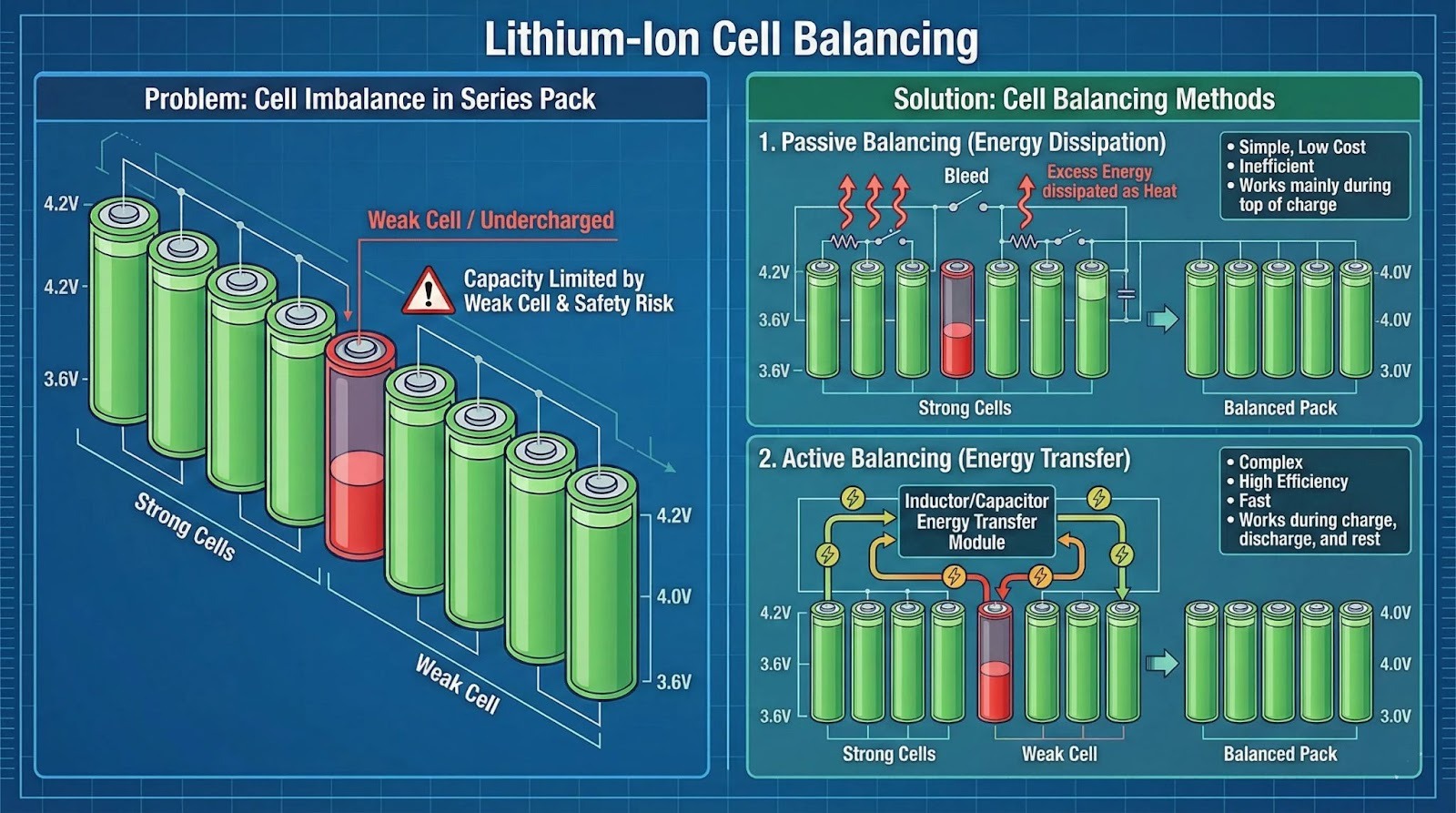
Another reason lithium-ion batteries need to be balanced is because when you’re charging a lithium-ion battery pack that has cell groups in series, the same sort of mishap can happen where the cell group that has a problem has a lower capacity than the others, so it fills up faster. So it could be overcharged to four or even five volts before the total battery voltage gets to what the charger and BMS are set to cut off at.
Different Types of Balancing
If you want to force a BMS to balance, you will have to understand what kind of balance system it uses.
Passive Balancing
If it’s passive balancing, then most of the time it will only work towards the top of the charge, but not when fully charged.
Passive balancing is always very slow. It’s 20 to 100 milliamps, most of the time around 50 to 60 milliamps. So even if it doesn’t say passive or active balancing, you can tell: if you have a very low balance current, it’s more than likely passive balancing.
Passive balancing works by bleeding off excess energy into a load resistor where it is dissipated as heat.
Active Balancing
If it’s active balancing, then it will more than likely work across a wider range, but still won’t work towards the lower end of the state of charge.
Active balancing is more efficient and moves energy from high cells to low cells. It can work faster because it uses active components instead of simply relying on resistors.
If you can see the circuit board, then you can look for large capacitors or inductor coils. If you see something like that, then it’s more than likely active balancing.
Sometimes You Can’t Know for Sure
Sometimes there’s no way to know for sure because the BMS doesn’t have that listed in the spec sheet, and it’s not a smart BMS that is configurable.
But we can make some assumptions. If you have a cheap, passively balanced BMS that is not configurable and doesn’t have an app, then most of the time the balancing will kick in somewhere around 3.5 to 3.6 volts, and it will stop working somewhere around 4.0 to 4.1 volts. That’s not a for-sure thing, but that is a good rule of thumb to use.
There are other conditions that have to be met, such as:
- There has to be a minimum voltage difference between cell groups.
- For cheap BMS: this could be 10 to 30 millivolts.
- For a nice BMS: this could be 3 to 5 millivolts, and it can be configurable.
This is the amount of voltage difference the cell groups have to have before balancing is even initiated, even if the other conditions are met.
- For cheap BMS: this could be 10 to 30 millivolts.
- Temperature is another thing that has to be within spec and normal ranges before balancing will start.
On some really nice smart BMS, you can simply turn on the switch for balancing, but it still has to meet those other conditions mentioned above.
Considering the fact that most people are not using super high-end BMSs, and considering the fact that it’s really easy to find out how to do that just by using the app and pressing the button, this article focuses on the cheap BMS.
How Do I Force a BMS to Balance?
With these types of BMS, there’s no balance switch you can turn on. So all you can really do is make sure all of those conditions are met to force a BMS to balance.
That means you should:
- Put it on a charger and charge it to around 4.0 volts per cell.
- Unplug it from the charger and let it drain to about 3.8 volts per cell.
- Plug it back into the charger again.
- Keep doing that.
This gives it the conditions needed to engage balancing.
How to Verify That a BMS Is Balancing
So, you’ve gotten to the point where you are attempting to force a BMS to balance, and you’re not quite sure if it’s working or not. This can be kind of tricky, especially if you have a simple BMS that does not have an app that lets you see all of the cell group voltages.
If You Don’t Want to Open the Battery Pack
The best thing you can do is to see if you can charge it to a higher voltage than before.
Remember, if a battery pack is out of balance, that means one or more of the cell groups are going to reach HVC (high voltage cutoff), which for most lithium-ion batteries will be 4.2 volts per cell. That’s going to happen before the other lower cells get charged, so your battery is never going to make it to the set charge voltage.
So you can try to force the BMS to balance for an hour or two, and then see if the voltage has gone up any.
If You Can Open the Battery Pack
If you are able to get into the battery pack and you have a multimeter handy, then you can check the cell group voltage of the low cell group over time and see if it’s going up directly. This takes all of the guesswork out of it, but it’s harder to do.

Pretty versatile multimeter. Accurately measures AC & DC current, voltage, capacitance, and more.
Check price on AmazonHow To Force A BMS To Balance
To force a typical cheap BMS to balance, you mainly have to create the conditions where balancing is allowed to turn on. In most cases, that means charging the pack to around 4.0 volts per cell, unplugging it and letting it drop to about 3.8 volts per cell, then plugging it back in and repeating that cycle so the BMS spends more time in the voltage range where it usually balances. While doing this, make sure the pack temperature stays within normal operating range, and remember that many BMS boards also require a minimum voltage difference between cell groups before they will even start balancing. After an hour or two of this process, you can check progress by seeing whether the pack will now charge to a higher overall voltage than it did before, and if you can access the cell groups safely with a multimeter, you can confirm balancing directly by watching the low cell group voltage rise over time.